September 2, 2026
Business Process Automation: Practical Guide for Businesses
Business Process Automation: A Practical Guide for Mod...
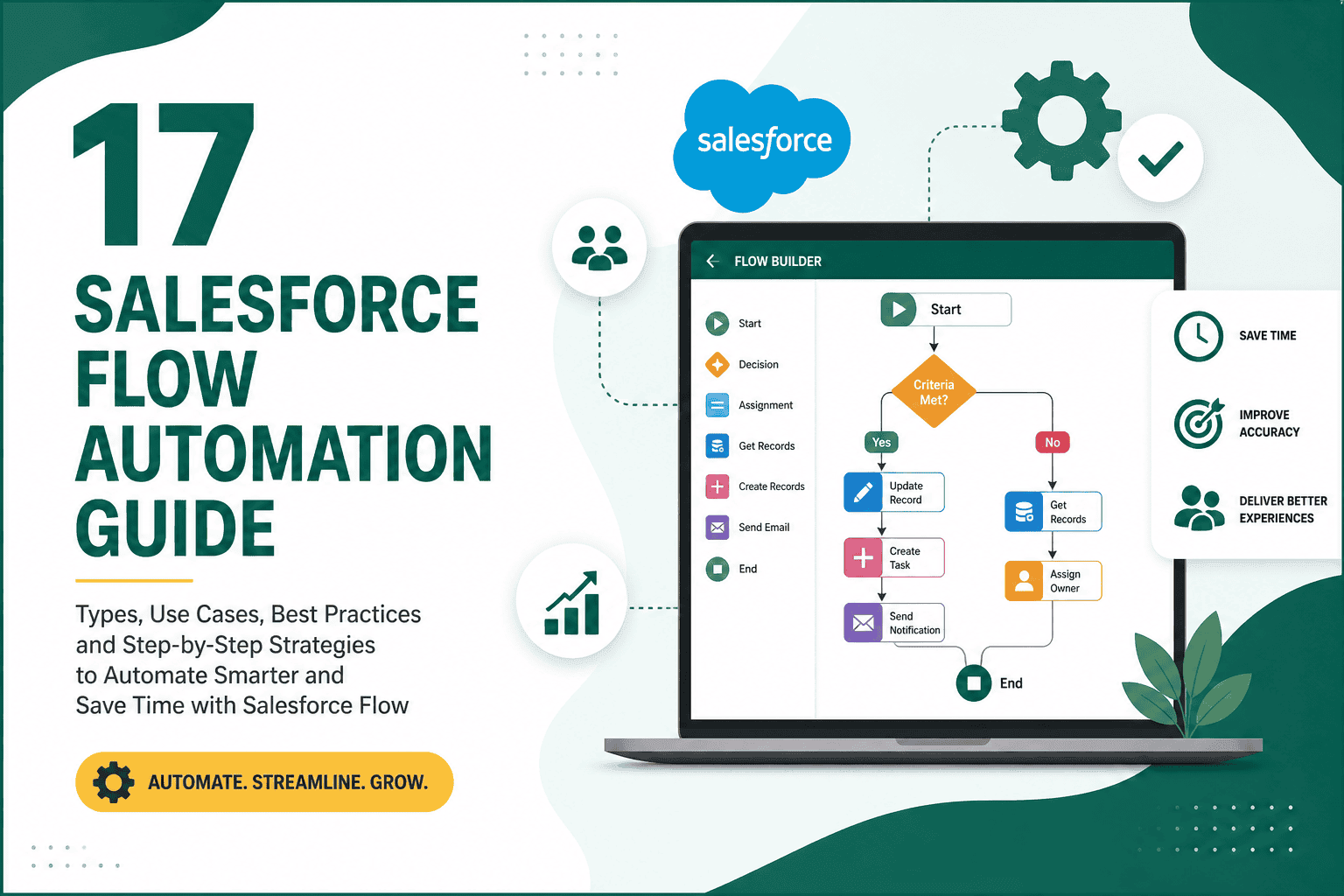
This salesforce flow automation guide explains how Salesforce Flow works, when to use it, what types of automations you can build, and how to design reliable flows that save time without creating unnecessary complexity. Salesforce Flow is one of the most powerful automation tools in the Salesforce platform. It allows administrators, consultants, and technical teams to automate business processes, guide users through screens, update records, send notifications, create related records, collect data, and connect systems with less dependency on custom code.
Used correctly, Flow can improve sales follow-up, customer service, lead routing, approvals, onboarding, data quality, reporting, and operational efficiency. Used poorly, it can slow down your org, create conflicting automations, confuse users, or cause errors in critical business processes. The goal is not simply to automate as much as possible. The goal is to automate the right processes in a structured, scalable, and maintainable way.
Salesforce Flow is a declarative automation tool that lets users build business logic using visual elements instead of writing code. A flow can perform actions when records are created or updated, guide users through a screen-based process, run on a schedule, respond to platform events, or be launched from buttons, Lightning pages, approvals, and other Salesforce features.
Flow is now the primary automation builder in Salesforce. Older automation tools such as Workflow Rules and Process Builder have largely been replaced by Flow because it offers more flexibility, stronger logic, better control, and broader use cases.
For businesses already using Salesforce as their central CRM, Flow can become a major productivity driver. If you are still defining your broader CRM strategy, this guide pairs well with Salesforce CRM best practices, especially when planning automation, data quality, user adoption, and reporting.
Salesforce is powerful because it stores, connects, and organizes business data. Flow makes that data actionable. Instead of relying on users to remember every follow-up, update, task, email, handoff, or compliance step, Flow can automate repetitive actions and standardize business processes.
Common benefits of Salesforce Flow include:
Flow is especially valuable when it supports a clear business process. If your company is still mapping its digital operations, it may help to review a broader business process automation guide before building complex Salesforce automations.
Salesforce offers several types of flows. Choosing the correct flow type is one of the most important decisions in any automation project.
Record-triggered flows run automatically when a Salesforce record is created, updated, or deleted. These are among the most common flows because they respond directly to changes in your CRM data.
Examples include:
Record-triggered flows can run before save or after save. Before-save flows are generally faster and are best for updating fields on the same record. After-save flows are used when the automation needs to create related records, update other objects, send emails, call subflows, or perform more complex actions.
Screen flows guide users through a step-by-step process using forms, questions, choices, and instructions. They are useful when a user needs to enter information, make selections, or follow a structured workflow.
Examples include:
Screen flows are powerful because they improve user experience. Instead of asking users to navigate multiple objects and fields manually, you can guide them through only the information they need to provide.
Scheduled-triggered flows run at a defined time and frequency. They are useful for processes that need to check records periodically instead of reacting instantly to a record change.
Examples include:
Autolaunched flows run without screens and are often called by other automation tools, Apex, buttons, or subflows. They are useful for reusable logic that may need to run from multiple places.
For example, you might create an autolaunched flow that assigns a customer success manager based on account segment and region. That same logic can then be reused from a record-triggered flow, screen flow, or custom button.
Platform event-triggered flows run when Salesforce receives a platform event. They are useful for more advanced, event-driven architectures, especially when Salesforce needs to respond to activity from external systems.
If your automation depends heavily on external applications, middleware, websites, ecommerce platforms, or databases, it is also worth reviewing a dedicated Salesforce integration guide so your flows are designed around reliable data movement and system boundaries.
Flow can automate lead assignment based on geography, product interest, company size, source, industry, or sales territory. It can also create follow-up tasks, notify sales reps, update lead status, and enforce response-time rules.
Example automation:
Sales teams often rely on consistent opportunity processes. Flow can help standardize stage movement, create tasks, update forecast fields, notify managers, and prevent missing information.
Examples include:
Flow can support Service Cloud processes by routing cases, escalating urgent issues, creating follow-up tasks, and guiding agents through support workflows.
For service teams, Flow can be especially useful when combined with case management, knowledge, queues, entitlements, and omnichannel routing. If your automation work is focused on support operations, review this Salesforce Service Cloud guide to understand how Flow fits into a broader customer service setup.
Bad data weakens reporting, personalization, automation, and user trust. Flow can help improve data quality by standardizing field values, preventing incomplete records, updating related records, and prompting users to provide missing information.
Examples include:
Flow is useful for handoffs between sales, implementation, support, finance, and customer success teams. When a deal closes, Flow can create onboarding tasks, implementation records, welcome emails, internal alerts, and project kickoff steps.
Example closed-won automation:
Salesforce Flow is the recommended automation tool for most new automation projects. Workflow Rules and Process Builder were useful in the past, but Flow now provides much more control and flexibility.
Key differences include:
If your Salesforce org still relies heavily on Workflow Rules or Process Builder, consider planning a gradual migration to Flow. Avoid rebuilding everything at once without documentation, testing, and prioritization.
Before opening Flow Builder, define the business process clearly. Many automation problems happen because teams start building too quickly without confirming the desired outcome, exceptions, ownership, and data requirements.
Start with the reason for the automation. For example:
A flow should have a clear purpose. If the goal is vague, the automation will likely become difficult to maintain.
Document what currently happens manually. Identify who does the work, what records are involved, what triggers the action, what decisions are made, and where errors commonly occur.
Useful questions include:
Not every process should be automated. Some processes are too rare, too unclear, or too dependent on human judgment. Automating a broken process can make problems happen faster.
Good candidates for Flow usually have:
Select the flow type based on how the automation should start. If it should run when a record changes, use a record-triggered flow. If it should guide a user, use a screen flow. If it should run on a schedule, use a scheduled-triggered flow. If it should be reusable logic, consider an autolaunched flow.
Before building, outline the logic in simple terms. Include trigger conditions, decision paths, record updates, emails, tasks, and error handling. This makes the flow easier to review with stakeholders and easier to maintain later.
Name flows, variables, decisions, assignments, and actions clearly. A future admin should be able to understand the purpose of each element without guessing.
Good naming examples:
Avoid vague names such as “New Flow,” “Test Automation,” or “Update Records.”
A flow should solve a defined problem. Large flows that handle too many unrelated processes become difficult to troubleshoot. When logic grows, consider using subflows, separate flows by process, or redesigning the automation architecture.
Record-triggered flows should only run when necessary. Broad entry criteria can cause flows to run too often, waste system resources, and create unexpected updates.
For example, instead of triggering whenever an opportunity is edited, trigger only when the stage changes to Closed Won or when a specific field meets defined criteria.
If your flow only needs to update fields on the same record that triggered it, a before-save flow is usually more efficient than an after-save flow. Before-save flows are faster because Salesforce updates the record as part of the original save operation.
Multiple automations on the same object can conflict with each other. For example, one flow may update a field that triggers another flow, which then updates another field and creates unintended behavior.
To avoid conflicts:
Salesforce often processes many records at once through imports, integrations, mass updates, and API operations. Flows should be designed to handle bulk data safely.
Avoid designs that assume only one record will be processed at a time. Be careful with loops, record lookups, updates, and external calls. Poor bulk design can cause governor limit errors and failed transactions.
Fault paths help handle errors when something goes wrong. Instead of allowing a flow to fail silently or show confusing technical messages, fault paths can notify an admin, create an error log record, or display a helpful message to users.
Testing should include positive cases, negative cases, edge cases, missing data, different user profiles, and bulk updates. A flow that works for one clean test record may fail when real-world data is messy.
For larger changes, test in a sandbox before deploying to production. A structured Salesforce sandbox strategy helps teams validate automation safely before users depend on it in the live org.
One of the most common mistakes is building flows based on a quick request without fully understanding the process. Always clarify requirements before building.
If several flows run on the same object with unclear order and overlapping conditions, troubleshooting becomes difficult. Organize automation intentionally and document dependencies.
Screen flows should be simple, clear, and helpful. Too many screens, confusing labels, unnecessary required fields, or technical language can frustrate users and reduce adoption.
Hardcoded IDs, names, and values can break when moving between environments or when business rules change. Use custom metadata, custom settings, labels, or lookups where appropriate.
Flows are easier to build than to maintain. Without documentation, future admins may not understand why a flow exists, what it affects, or whether it can be changed safely.
Complex flows can affect system performance, especially when they run frequently or process large data volumes. If your org feels slow or automations take too long, review broader Salesforce performance tips to identify possible causes and optimization opportunities.
A sales team wants to qualify inbound leads consistently. A screen flow can guide a sales representative through qualification questions and update the lead record automatically.
The flow might collect:
Based on the answers, the flow can update lead rating, create a follow-up task, assign the lead to a sales queue, or convert qualified leads into accounts, contacts, and opportunities.
When an opportunity is marked Closed Won, an after-save record-triggered flow can create a customer onboarding process.
The flow can:
A support team wants urgent cases escalated automatically. A record-triggered flow can check case priority, customer tier, and time since creation.
If a high-priority case from a strategic customer remains unresolved for a defined period, the flow can:
A scheduled-triggered flow can run daily to find contracts ending within a specific time window. It can then create renewal opportunities, assign tasks to account owners, and send reminders.
This helps sales and customer success teams act before renewals are missed.
Testing is essential before activating any flow in production. A good testing process reduces the risk of broken records, failed transactions, duplicate tasks, incorrect emails, or user disruption.
Use this testing checklist:
Flow deployment should be planned carefully, especially for automations that affect sales, service, finance, customer data, or integrations. For simple changes, a change set or Salesforce deployment tool may be enough. For larger teams, source control and structured release management are recommended.
A safe deployment process usually includes:
If your organization has multiple admins, developers, consultants, or business units changing Salesforce, follow structured Salesforce deployment best practices to reduce the risk of broken automation or production disruption.
As your Salesforce org grows, Flow governance becomes increasingly important. Governance means having standards for how automations are requested, designed, named, tested, approved, documented, and maintained.
Good Flow governance includes:
Without governance, Salesforce orgs often accumulate duplicate flows, outdated business logic, unused versions, and automations no one fully understands.
Flow is powerful, but it does not replace Apex in every situation. Use Flow when the process can be managed declaratively, maintained by admins, and designed within Salesforce automation limits. Use Apex when the logic is too complex, performance-sensitive, highly customized, or requires advanced transaction control.
Flow is usually good for:
Apex may be better for:
Many mature Salesforce orgs use both Flow and Apex. The best solution depends on business needs, technical complexity, maintainability, and available skills.
Use this checklist before activating a new Salesforce Flow:
Salesforce Flow is one of the most valuable tools for automating CRM processes, improving team productivity, and creating consistent customer experiences. It can support sales, service, marketing, operations, onboarding, reporting, and data quality when designed correctly.
The key is to treat Flow as part of a broader business system, not just a quick automation tool. Start with clear requirements, choose the right flow type, keep logic focused, test thoroughly, document decisions, and monitor performance after launch. With the right approach, Salesforce Flow can help your organization reduce manual work, improve accuracy, and get more value from Salesforce every day.