July 22, 2026
Why Oxygen Builder Is Faster: Speed & SEO Benefits
Why Oxygen Builder Is Faster If you are comparing Word...
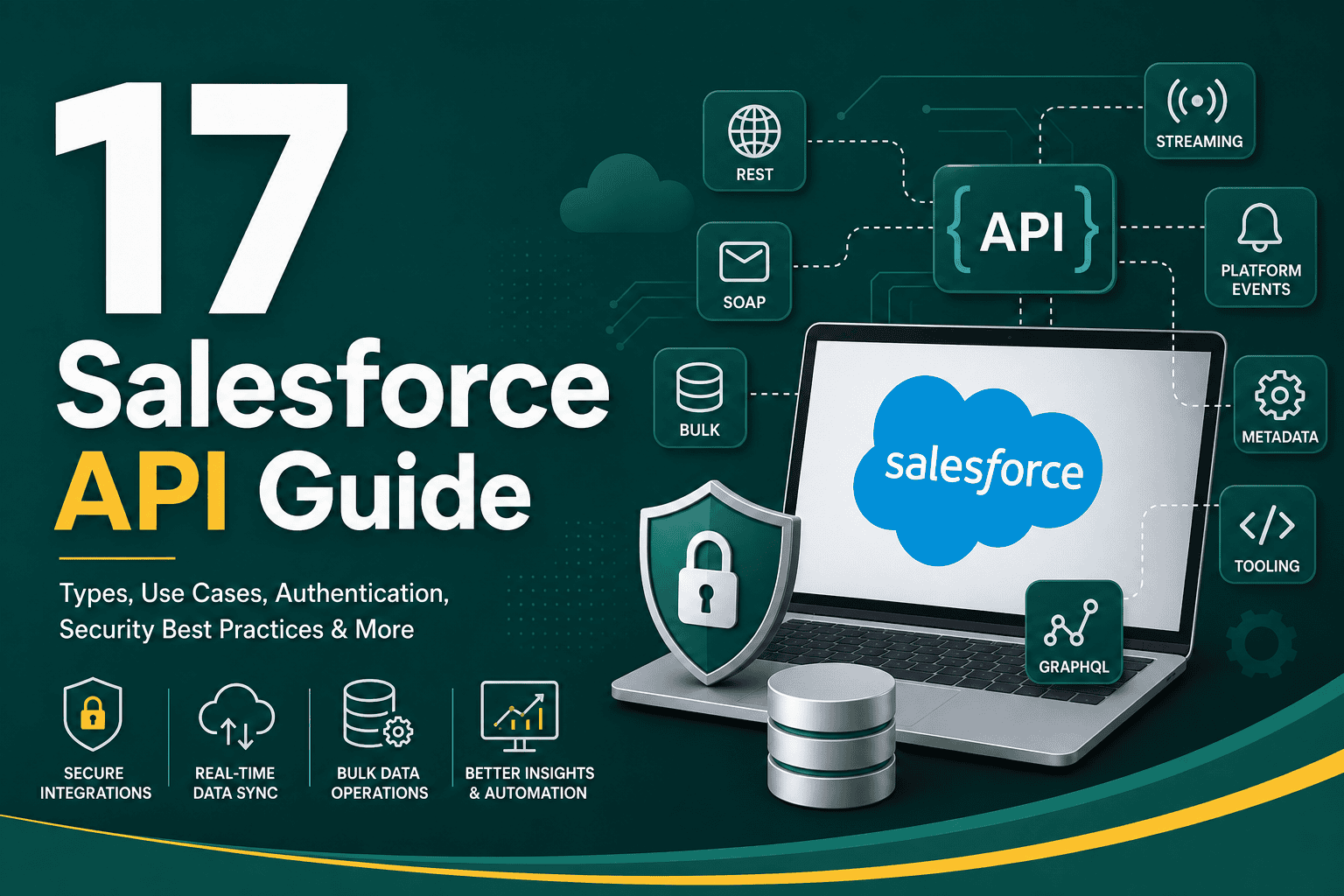
This Salesforce API guide explains what Salesforce APIs are, how they work, when to use each API type, and how to plan secure, scalable integrations. Salesforce is more than a CRM interface for sales, service, and marketing teams. It is also a powerful platform that allows external systems, websites, applications, databases, middleware, and automation tools to exchange data with your Salesforce org.
Whether you want to sync leads from a website, connect Salesforce with an ERP system, build a customer portal, automate reporting, or integrate ecommerce orders, Salesforce APIs provide the technical foundation. The key is choosing the right API for the job, protecting data access, respecting limits, and designing integrations that can grow with your business.
The Salesforce API is a collection of interfaces that allow external applications to interact with Salesforce data and platform features programmatically. Instead of users manually entering, updating, exporting, or importing information through the Salesforce interface, an API lets systems communicate directly.
For example, a web form can create a Lead in Salesforce, an accounting system can update an Account record, a reporting platform can pull Opportunity data, or a mobile app can retrieve customer information for an authenticated user. APIs make Salesforce a connected part of your wider business technology stack rather than an isolated database.
If you are still planning how Salesforce should connect with the rest of your systems, this broader Salesforce integration guide explains common integration methods, planning considerations, and best practices.
Salesforce APIs matter because modern businesses rarely operate from one platform alone. Customer data may come from websites, ad platforms, support tools, ecommerce stores, billing systems, marketing automation platforms, event systems, data warehouses, and custom apps. Without APIs, teams often rely on manual exports, duplicate data entry, spreadsheets, and disconnected reporting.
Using Salesforce APIs correctly can help you:
Salesforce offers several APIs, each designed for different use cases. Choosing the right one depends on your data volume, timing needs, integration pattern, security requirements, and development approach.
The REST API is one of the most commonly used Salesforce APIs. It uses standard HTTP methods such as GET, POST, PATCH, and DELETE, making it familiar to many developers. REST API is often used for web apps, mobile apps, lightweight integrations, and systems that need to create, read, update, or delete Salesforce records.
Common REST API use cases include:
REST API is flexible and relatively easy to work with, but it may not be the best option for very large data operations where bulk processing is required.
The SOAP API is an older but still important Salesforce API. It uses XML-based messaging and is often used in enterprise environments where strict contracts, formal schemas, and legacy system compatibility are required.
SOAP API can be useful when integrating Salesforce with systems that already support SOAP-based communication, such as some ERP, financial, government, or enterprise software platforms. Compared with REST, SOAP is usually more structured and heavier, but it may fit better in environments with established enterprise integration standards.
The Bulk API is designed for large-volume data operations. If you need to insert, update, upsert, delete, or query thousands or millions of records, Bulk API is usually more appropriate than standard REST or SOAP calls.
Common Bulk API use cases include:
Bulk API processes records asynchronously, which means Salesforce handles the work in batches rather than requiring each record operation to complete immediately. This makes it more efficient for high-volume jobs.
The Streaming API is used when external systems need to receive near-real-time notifications about changes in Salesforce. Instead of repeatedly asking Salesforce whether something changed, an external system can subscribe to events and receive updates when relevant changes occur.
Streaming API is useful for:
For example, if an Opportunity reaches a specific stage, a downstream system could be notified and trigger a fulfillment, reporting, or customer success workflow.
Platform Events allow Salesforce and external systems to communicate using an event-driven architecture. Instead of integrations being built only around direct record updates, systems can publish and subscribe to business events.
For example, Salesforce could publish an event when a new contract is signed, a case is escalated, or an order is approved. Other systems can subscribe to those events and take action. Platform Events are especially useful for complex, decoupled integrations where multiple systems need to respond to business activity.
The Metadata API is used to retrieve, deploy, create, update, or delete Salesforce configuration and customization metadata. This includes items such as custom objects, fields, page layouts, Apex classes, permissions, workflows, and other setup components.
Metadata API is commonly used in development, DevOps, version control, and deployment workflows. If your team frequently moves configuration changes between environments, it is important to understand how API-based deployment fits into your governance process. This is closely related to Salesforce deployment best practices, especially when managing changes safely across sandboxes and production.
The Tooling API is designed for building development tools and working with Salesforce metadata at a more granular level. Developers may use it to interact with Apex classes, triggers, debug logs, code coverage, and other development-related resources.
Tooling API is often used by IDEs, development tools, automated testing systems, and custom deployment utilities.
Salesforce also supports GraphQL capabilities for specific use cases. GraphQL allows clients to request exactly the data they need in a single query structure. Instead of making multiple API calls to retrieve related information, a GraphQL query can be designed to return structured related data more efficiently.
GraphQL can be useful for front-end applications and custom user experiences where performance and precise data retrieval matter.
Salesforce APIs require authentication before an external system can access data. The most common approach is OAuth 2.0, which allows applications to access Salesforce securely without exposing user passwords directly.
Common Salesforce authentication patterns include:
For secure API access, avoid hardcoding credentials in scripts, spreadsheets, or public repositories. Use secure secrets management, rotate credentials when needed, and limit access to the minimum required permissions.
Salesforce enforces API limits to protect platform performance and ensure fair usage. These limits vary based on Salesforce edition, licenses, and org configuration.
Common limits to consider include:
API limit planning is important because poorly designed integrations can consume requests quickly. For example, an integration that checks Salesforce every few seconds for changes may waste API calls, while an event-driven approach may be more efficient.
A common Salesforce API use case is sending leads from a website form into Salesforce. When a visitor submits a form, the website or form platform can create a Lead record, assign lead source details, trigger routing logic, and notify the sales team.
This type of integration can improve response time and reduce manual data entry. However, it should include spam protection, field validation, duplicate handling, and clear lead source tracking.
Salesforce often connects with email marketing, marketing automation, advertising, and analytics tools. APIs can sync Leads, Contacts, campaign membership, lifecycle stages, and engagement activity.
For example, when a prospect fills out a form, Salesforce can receive the lead while the marketing system manages nurture emails. When the lead becomes sales-ready, Salesforce can route it to the right sales representative.
Many businesses connect Salesforce with ERP or accounting systems to sync customer records, invoices, orders, payments, product data, or contract details. This helps sales and operations teams work from consistent information.
For example, when an Opportunity is marked Closed Won in Salesforce, an integration may create a customer record or order in an ERP system. When an invoice is paid, the accounting system may update Salesforce so the account team can see payment status.
Salesforce APIs can connect service cases, ticketing tools, live chat platforms, knowledge bases, and customer portals. This creates a stronger customer service experience because agents can see a fuller picture of each customer.
For service organizations, API integrations can help automate case creation, escalate urgent issues, sync product information, and keep customer history available across systems.
Salesforce data is often exported into business intelligence tools or data warehouses for advanced reporting. APIs can move Salesforce data into platforms that combine CRM data with finance, product, marketing, and operational data.
This is useful when leadership needs reporting that goes beyond standard Salesforce dashboards, such as full-funnel attribution, revenue forecasting, customer lifetime value, or multi-system performance analysis.
Businesses may build custom web or mobile applications that use Salesforce as the backend source of customer data. For example, a partner portal, customer dashboard, quoting tool, booking system, or field service app may retrieve and update Salesforce records through APIs.
The right Salesforce API depends on the integration goal. A lightweight web form does not need the same approach as a high-volume data migration or event-driven enterprise workflow.
| Need | Recommended API |
|---|---|
| Create or update individual records from an app | REST API |
| Integrate with legacy enterprise systems | SOAP API |
| Import, export, or update large volumes of data | Bulk API |
| Receive near-real-time notifications | Streaming API |
| Build event-driven integrations | Platform Events |
| Deploy or manage configuration metadata | Metadata API |
| Build developer tools or inspect Apex-related resources | Tooling API |
Security is one of the most important parts of any Salesforce API implementation. APIs can expose sensitive customer, sales, financial, or operational data if access is not carefully controlled.
Do not give an integration user broad administrative access unless absolutely necessary. Create dedicated integration users with only the permissions required for the specific integration.
Access design should align with your broader Salesforce security model. If your org’s roles, profiles, and sharing settings are not clearly defined, this guide to Salesforce user roles, profiles, and access can help clarify how permissions and record visibility work.
Connected Apps define how external applications authenticate with Salesforce. Configure callback URLs, scopes, policies, token settings, and permitted users carefully. Avoid granting overly broad OAuth scopes unless the application truly needs them.
Access tokens, refresh tokens, client secrets, certificates, and private keys should be stored securely. Never expose them in front-end code, shared documents, unsecured scripts, or public repositories.
Regularly review API usage, integration user activity, login history, and connected app behavior. Monitoring helps identify abnormal usage patterns, failing integrations, unexpected data access, and potential security issues.
Do not assume data from external systems is clean or safe. Validate required fields, data types, picklist values, email formats, phone numbers, ownership rules, and duplicate conditions before creating or updating Salesforce records.
Before building an integration, confirm where data should live in Salesforce. Decide whether information belongs on standard objects such as Lead, Account, Contact, Opportunity, Case, Product, or on custom objects.
Poor data modeling creates long-term reporting, automation, and usability problems. A well-designed data model supports cleaner API integrations and better business workflows.
Efficient integrations reduce API usage. Instead of making multiple calls for each record, consider batching, using composite requests, caching reference data, or using event-driven patterns where appropriate.
Upsert allows an integration to update an existing record or create a new one based on an external ID. This is useful when syncing records from another system and helps reduce duplicate creation.
External IDs are fields that store identifiers from other systems. For example, an ERP customer ID, ecommerce order ID, or marketing platform contact ID can be stored in Salesforce. This makes matching and syncing records more reliable.
Every API integration should have clear error handling. If a record fails to sync, the problem should be logged, visible to the right team, and retryable when appropriate.
Common errors include:
An integration that works with 100 records may fail with 100,000 records if it was not designed properly. Consider projected data volume, peak activity, retry logic, API limits, and long-term business growth before choosing your approach.
Never build or test major API integrations directly in production unless the change is extremely limited and low risk. Salesforce sandboxes allow teams to test integrations, data flows, automation, permissions, and deployments without affecting live users or production data.
A good sandbox strategy helps reduce failed launches and integration-related disruption. This Salesforce sandbox guide explains the main sandbox types and how to use them for development, testing, and training.
API integration testing should include:
Field mapping defines how data from one system corresponds to fields in Salesforce. For example, a website form field called “Company Name” may map to the Salesforce Lead Company field, while “Inquiry Type” may map to a custom picklist.
Good field mapping should document:
Field mapping should be approved by both technical and business stakeholders. Otherwise, integrations may technically work but create confusing data for sales, service, marketing, or reporting teams.
Using REST API for a large data migration can be inefficient. Using Bulk API for small real-time updates may be unnecessary. Using polling when an event-driven approach would work better can waste API calls. Match the API to the business need.
Some teams build integrations without considering limits until they start failing. API limits should be part of the design from the beginning, especially when multiple integrations share the same Salesforce org.
Giving every integration administrator-level access may seem convenient, but it increases risk. Use dedicated integration users and permission sets designed for the specific integration.
Integrations can trigger validation rules, flows, assignment rules, duplicate rules, and Apex logic. Testing in a sandbox helps reveal issues before production users are affected.
Undocumented integrations are difficult to troubleshoot and maintain. Every integration should include documentation for authentication, endpoints, field mappings, schedules, owners, error handling, and dependencies.
Without external IDs, duplicate rules, or matching logic, integrations may create duplicate Leads, Contacts, Accounts, or custom records. Duplicate data damages reporting and user trust.
APIs and automation often work together. An API may create or update a record, while Salesforce Flow, assignment rules, email alerts, approval processes, or Apex logic determine what happens next.
For example, a website form submission can create a Lead through the API. Salesforce automation can then assign the Lead to the right owner, send a notification, create a task, add the Lead to a campaign, and update a reporting field.
If you are looking for broader CRM automation opportunities, these CRM workflow examples show practical ways automation can support sales, marketing, and service teams.
As your business grows, Salesforce API usage should be governed like any other critical system process. Without governance, integrations can become messy, insecure, duplicated, or fragile.
Good API governance includes:
Use this checklist before launching a Salesforce API integration:
Salesforce APIs are not just technical tools. When used well, they support better customer data, faster response times, more accurate reporting, and stronger operational efficiency. They help Salesforce become a connected system of record rather than a separate tool that employees must manually update.
However, successful API usage depends on more than development. Teams also need clean processes, thoughtful data architecture, user adoption, security planning, and ongoing governance. For a broader operational perspective, these Salesforce CRM best practices can help you strengthen the overall foundation around your API and integration work.
This Salesforce API guide covered the major API types, authentication methods, use cases, security considerations, testing practices, and common mistakes to avoid. Salesforce APIs are powerful because they allow your CRM to connect with the rest of your business systems, automate data movement, and support better customer experiences.
The most successful Salesforce API projects begin with a clear business goal, a well-designed data model, the right API choice, secure authentication, careful testing, and strong governance. Whether you are building a simple lead capture integration or a complex enterprise data architecture, thoughtful planning will help your Salesforce org remain scalable, reliable, and useful for the teams that depend on it every day.