CRM Workflow Examples: Practical Automations for Sales, Marketing, and Customer Service
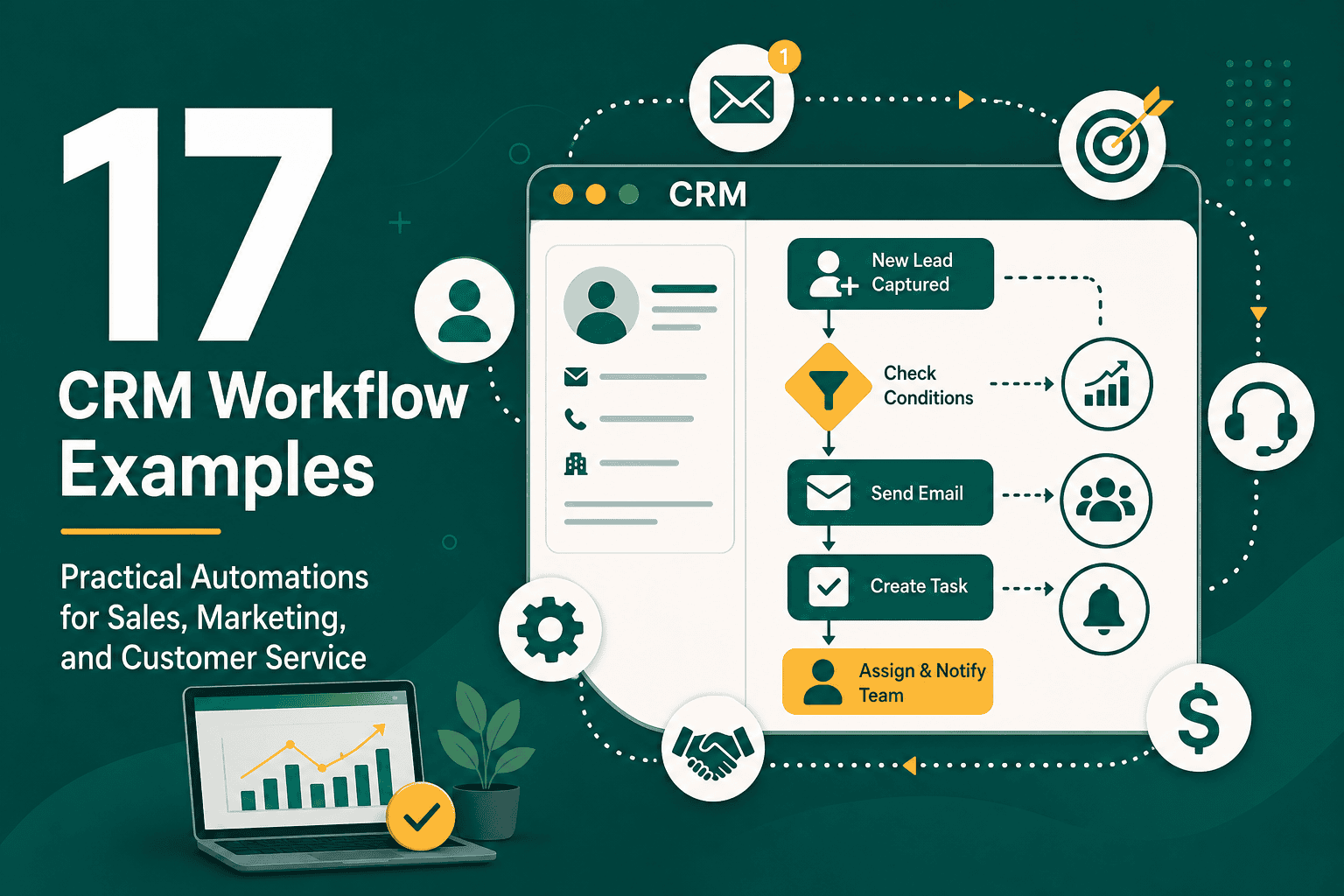
CRM workflow examples help businesses understand how customer relationship management software can automate repetitive tasks, improve follow-up, reduce manual errors, and create a more consistent customer experience. A CRM workflow is a series of automated or semi-automated steps triggered by a specific event, condition, or user action inside your CRM system.
For example, when a new lead fills out a website form, a CRM workflow can automatically create a lead record, assign it to the right sales representative, send a welcome email, schedule a follow-up task, and notify the team. Instead of relying on memory or manual updates, the workflow ensures the next step happens every time.
Whether you use Salesforce, HubSpot, Zoho, Pipedrive, Microsoft Dynamics, or another CRM platform, the principles are similar. The best CRM workflows connect people, data, tasks, communication, and reporting so your business can operate more efficiently.
What Is a CRM Workflow?
A CRM workflow is an automated business process inside a customer relationship management system. It defines what should happen when certain conditions are met. These conditions might include a new lead being created, a deal moving to a new stage, a customer submitting a support request, or an account becoming inactive.
If you are still learning the fundamentals of customer relationship management, this guide to what CRM is and how it works explains the core concepts behind CRM systems, customer data, sales pipelines, and relationship management.
A typical CRM workflow includes:
- Trigger: The event that starts the workflow, such as a form submission or status change.
- Condition: The rule that determines whether the workflow should continue, such as lead source, deal value, or customer type.
- Action: The task the CRM performs, such as sending an email, creating a task, updating a field, or assigning a record.
- Notification: An alert sent to a user or team when attention is needed.
- Outcome: The desired result, such as faster lead response, better customer onboarding, or fewer missed follow-ups.
Why CRM Workflows Matter
CRM workflows are important because they help teams standardize the way they manage leads, customers, opportunities, and service requests. Without workflows, every team member may handle the same process differently. That creates inconsistent communication, lost data, delayed follow-ups, and poor reporting.
Well-designed CRM workflows can help your business:
- Respond to leads faster.
- Assign tasks to the right people automatically.
- Reduce repetitive manual work.
- Improve sales pipeline visibility.
- Keep customer data cleaner and more complete.
- Standardize follow-up and onboarding processes.
- Improve collaboration between sales, marketing, and service teams.
- Create more accurate reports and forecasts.
CRM workflows are also a major part of broader operational improvement. If your company is modernizing systems, processes, and customer experiences, CRM automation should be considered part of your digital transformation strategy.
CRM Workflow Examples for Lead Management
1. New Lead Capture Workflow
A new lead capture workflow starts when someone submits a form on your website, downloads a resource, signs up for a consultation, or contacts your business through a campaign landing page.
Example workflow:
- A visitor submits a contact form.
- The CRM creates a new lead record.
- The lead source is marked as website, Google Ads, social media, referral, or organic search.
- The lead is assigned to a sales representative based on region, service interest, company size, or round-robin assignment.
- The lead receives an automated confirmation email.
- The assigned salesperson receives a notification.
- A follow-up task is created with a due date.
This workflow is useful because speed matters. The faster your team responds to a qualified lead, the higher the chance of starting a meaningful conversation.
2. Lead Qualification Workflow
A lead qualification workflow helps your team separate high-quality leads from low-intent inquiries. Instead of treating every lead the same way, the CRM can score or categorize leads based on behavior and profile data.
Example workflow:
- A lead enters the CRM from a form, webinar, ad, or referral.
- The CRM checks fields such as budget, company size, job title, industry, location, and service interest.
- The lead receives a score based on fit and engagement.
- If the score is high, the CRM assigns the lead to sales.
- If the score is medium, the lead enters an email nurturing sequence.
- If the score is low, the lead is tagged for long-term marketing follow-up.
This type of workflow helps sales teams focus their time on leads that are more likely to convert while still allowing marketing to nurture early-stage prospects.
3. Lead Assignment Workflow
A lead assignment workflow automatically routes new leads to the right person or team. This prevents confusion and removes the need for manual lead distribution.
Example assignment rules:
- Assign enterprise leads to senior sales representatives.
- Assign leads by geographic territory.
- Assign product-specific leads to specialized teams.
- Assign leads from a specific campaign to a dedicated sales group.
- Use round-robin assignment to distribute leads evenly.
For Salesforce users, workflow planning should be connected to configuration, data quality, and adoption standards. These Salesforce CRM best practices provide useful guidance for building a CRM that teams can actually use effectively.
CRM Workflow Examples for Sales Teams
4. Deal Stage Update Workflow
A deal stage workflow automates actions when an opportunity moves from one stage to another. This helps sales managers track progress and helps representatives follow a consistent sales process.
Example workflow:
- A salesperson moves a deal from “Discovery” to “Proposal Sent.”
- The CRM automatically updates the probability percentage.
- A task is created to follow up in three business days.
- The sales manager receives a notification if the deal value is above a defined amount.
- The proposal document is attached to the opportunity record.
- The forecast report updates automatically.
This workflow gives managers better visibility into the pipeline while helping sales representatives avoid missed follow-ups.
5. Stalled Opportunity Workflow
A stalled opportunity workflow identifies deals that have not moved forward after a certain number of days. This is useful for keeping sales pipelines clean and realistic.
Example workflow:
- An opportunity remains in the same stage for 14 days.
- The CRM sends a reminder to the opportunity owner.
- A follow-up task is created automatically.
- If there is no update after another seven days, the sales manager is notified.
- The deal is flagged as at risk.
This workflow helps prevent opportunities from sitting unnoticed in the pipeline. It also improves sales forecasting by encouraging timely updates.
6. Quote Approval Workflow
A quote approval workflow is useful when sales representatives need management approval before sending discounts, custom pricing, or special contract terms.
Example workflow:
- A salesperson creates a quote with a discount above 15%.
- The CRM automatically submits the quote for manager approval.
- The manager receives a notification with quote details.
- The manager approves, rejects, or requests changes.
- If approved, the salesperson receives permission to send the quote.
- The approval status is recorded in the CRM.
This creates accountability and prevents unauthorized pricing decisions while still allowing the sales process to move quickly.
7. Closed Won Workflow
A closed won workflow begins when a sales opportunity becomes a customer. This is one of the most important CRM workflow examples because it connects sales activity with onboarding, finance, delivery, and customer success.
Example workflow:
- A deal is marked as closed won.
- The CRM converts the opportunity into an active customer account.
- An onboarding project or implementation task is created.
- The customer success team is notified.
- An invoice request is sent to the finance team.
- A welcome email is sent to the customer.
- A kickoff call task is created.
This workflow reduces handoff problems between sales and service teams. It also helps create a professional first impression after the customer signs.
8. Closed Lost Workflow
A closed lost workflow helps your business learn why deals are not converting. Instead of simply marking a deal as lost, the CRM can require useful feedback and trigger future nurturing.
Example workflow:
- A salesperson marks an opportunity as closed lost.
- The CRM requires a lost reason, such as price, timing, competitor, budget, or poor fit.
- The contact is added to a long-term nurturing list if appropriate.
- The sales manager receives a monthly report of lost reasons.
- If the reason is “not ready yet,” a follow-up task is created for three or six months later.
This helps your team improve sales messaging, pricing strategy, targeting, and future follow-up.
CRM Workflow Examples for Marketing
9. Email Nurturing Workflow
An email nurturing workflow sends relevant content to leads who are not ready to buy yet. This keeps your business visible while educating prospects over time.
Example workflow:
- A lead downloads a guide or signs up for a webinar.
- The CRM adds the lead to a nurturing sequence.
- The lead receives a welcome email.
- After three days, the lead receives a case study.
- After one week, the lead receives a product or service comparison.
- If the lead clicks a high-intent link, the CRM notifies sales.
- If the lead does not engage, the CRM moves them into a lower-frequency campaign.
This workflow helps marketing support the sales process by building trust before direct outreach happens.
10. Campaign Source Tracking Workflow
A campaign source tracking workflow makes sure every lead is connected to the campaign or channel that generated it. This is important for measuring marketing return on investment.
Example workflow:
- A lead submits a landing page form.
- The CRM captures UTM parameters such as source, medium, campaign, and keyword.
- The lead record is tagged with the original source.
- The campaign record updates with the new lead count.
- If the lead becomes an opportunity, revenue is attributed to the campaign.
This workflow helps marketing and sales teams understand which campaigns generate qualified leads, not just form submissions.
11. Re-Engagement Workflow
A re-engagement workflow targets leads or customers who have gone inactive. Instead of letting them disappear from your database, the CRM can automatically trigger renewed communication.
Example workflow:
- A lead has not opened an email or visited the website in 90 days.
- The CRM adds the lead to a re-engagement sequence.
- The lead receives a helpful resource, special offer, or check-in email.
- If the lead engages, their status changes to active.
- If the lead does not engage after several attempts, they are marked as inactive or suppressed from frequent campaigns.
This helps maintain database quality and can recover opportunities that would otherwise be forgotten.
CRM Workflow Examples for Customer Service
12. New Support Case Workflow
A new support case workflow helps customer service teams respond quickly when a customer submits a request.
Example workflow:
- A customer submits a support form or sends an email to support.
- The CRM creates a support case.
- The case is categorized by issue type, product, priority, or customer tier.
- The customer receives an automatic confirmation email.
- The case is assigned to the right support agent or queue.
- A response deadline is calculated based on service level agreement rules.
This workflow improves response time and creates a more organized support process.
13. Case Escalation Workflow
A case escalation workflow ensures urgent or unresolved issues receive attention from the right people.
Example workflow:
- A high-priority case remains unresolved for four hours.
- The CRM sends a notification to the support manager.
- The case priority is updated to escalated.
- A senior support specialist is assigned.
- If the issue remains unresolved after another defined period, leadership is notified.
This workflow helps businesses protect customer relationships by preventing serious issues from being ignored.
14. Customer Satisfaction Workflow
A customer satisfaction workflow collects feedback after a case is resolved, a project is completed, or a purchase is delivered.
Example workflow:
- A support case is marked as resolved.
- The CRM waits 24 hours.
- The customer receives a satisfaction survey.
- If the rating is positive, the customer may be asked for a testimonial or review.
- If the rating is negative, a manager is notified to follow up.
- The feedback score is stored on the customer record.
This gives your business a structured way to measure satisfaction and respond to unhappy customers before they churn.
CRM Workflow Examples for Customer Onboarding
15. New Customer Onboarding Workflow
A new customer onboarding workflow creates a consistent experience after a sale. This is especially useful for agencies, consultants, SaaS companies, service providers, and B2B businesses.
Example workflow:
- A deal is marked as closed won.
- The CRM creates an onboarding checklist.
- The customer receives a welcome email with next steps.
- An internal kickoff task is assigned.
- A customer kickoff meeting is scheduled.
- Required documents or access details are requested.
- The onboarding owner receives reminders until each step is complete.
This workflow reduces confusion and helps customers feel supported immediately after purchase.
16. Implementation Milestone Workflow
An implementation milestone workflow tracks progress during a project, setup, migration, or onboarding process.
Example workflow:
- The customer enters the implementation stage.
- The CRM creates milestone tasks such as discovery, setup, testing, training, and launch.
- Each task has an owner and due date.
- If a milestone is overdue, the project manager receives a notification.
- When all milestones are complete, the customer is moved to active status.
This workflow is useful when customer success depends on timely delivery and coordination across multiple teams.
CRM Workflow Examples for Account Management
17. Renewal Reminder Workflow
A renewal reminder workflow helps account managers prepare before contracts, subscriptions, or service agreements expire.
Example workflow:
- A customer contract is 90 days from expiration.
- The CRM creates a renewal opportunity.
- The account manager receives a task to review the account.
- A reminder is sent 60 days before expiration.
- A final reminder is sent 30 days before expiration.
- If the renewal is completed, the contract date is updated.
This workflow reduces missed renewals and gives your team time to address concerns before the customer makes a decision.
18. Upsell and Cross-Sell Workflow
An upsell or cross-sell workflow identifies customers who may benefit from additional services, products, or plan upgrades.
Example workflow:
- A customer reaches a usage threshold or completes a successful project.
- The CRM checks whether the customer already uses related products or services.
- If there is a relevant opportunity, the account manager receives a notification.
- A personalized outreach task is created.
- The customer is added to a targeted educational campaign.
This workflow helps increase customer lifetime value without relying on random or poorly timed sales outreach.
19. At-Risk Customer Workflow
An at-risk customer workflow identifies warning signs that a customer may churn or become dissatisfied.
Example workflow:
- A customer has not logged in, ordered, responded, or engaged for a defined period.
- The CRM checks for open support cases, low satisfaction scores, or overdue invoices.
- The account is marked as at risk.
- The account manager receives a follow-up task.
- A retention sequence is triggered if appropriate.
This workflow gives your team a chance to intervene before the customer leaves.
CRM Workflow Examples for Data Quality
20. Duplicate Record Detection Workflow
Duplicate records can damage reporting, confuse sales teams, and create a poor customer experience. A duplicate detection workflow helps maintain clean CRM data.
Example workflow:
- A new contact or lead is created.
- The CRM checks for matching email addresses, phone numbers, or company names.
- If a possible duplicate is found, the record is flagged.
- A data manager or CRM admin receives a review task.
- The duplicate is merged, updated, or dismissed.
Clean data is essential for automation. If fields are incomplete, duplicated, or inconsistent, even a well-designed CRM workflow can produce poor results.
21. Required Field Completion Workflow
A required field completion workflow ensures key information is captured before records move forward in the process.
Example workflow:
- A salesperson attempts to move an opportunity to the proposal stage.
- The CRM checks whether required fields are complete.
- If important fields are missing, the CRM prevents the stage change or creates a task.
- The user completes fields such as decision maker, budget, close date, next step, and product interest.
- The opportunity can then move forward.
This improves reporting and helps managers understand what is really happening in the pipeline.
CRM Workflow Examples for Management and Reporting
22. Sales Manager Alert Workflow
A sales manager alert workflow notifies leadership when important events happen in the pipeline.
Example workflow:
- A deal above a defined value is created.
- The sales manager receives a notification.
- If the deal moves to negotiation, leadership is alerted again.
- If the close date changes more than once, the manager receives a warning.
- If the deal is won or lost, the manager receives a summary.
This workflow helps managers stay involved in high-value opportunities without manually checking every record.
23. Weekly Pipeline Review Workflow
A weekly pipeline review workflow prepares sales teams for structured pipeline meetings.
Example workflow:
- Every Friday, the CRM checks open opportunities.
- Opportunities without next steps are flagged.
- Deals with close dates in the past are identified.
- Pipeline reports are emailed to sales managers.
- Sales representatives receive reminders to update their records before the weekly meeting.
This workflow supports cleaner forecasts and more productive sales conversations.
CRM Workflow Examples for Integrations
24. Website Form to CRM Workflow
A website form integration workflow connects your website directly to your CRM. This reduces manual data entry and helps teams respond faster.
Example workflow:
- A visitor submits a form on your website.
- The website sends the form data to the CRM.
- The CRM creates or updates the lead record.
- The lead is assigned based on predefined rules.
- The lead receives a confirmation email.
- The sales team receives a notification.
CRM workflows often depend on reliable data movement between platforms. If your CRM needs to connect with your website, marketing tools, ecommerce system, accounting software, or service platform, this Salesforce integration guide explains important integration methods and planning considerations.
25. CRM to Accounting Workflow
A CRM to accounting workflow helps finance teams act when sales deals are closed.
Example workflow:
- A deal is marked as closed won.
- The CRM sends customer and deal information to the accounting platform.
- An invoice draft is created.
- The finance team receives a notification.
- Payment status is synced back to the CRM.
This workflow reduces delays between sales and billing and gives account teams better visibility into payment status.
How to Build Effective CRM Workflows
The best CRM workflows are not built by automating everything at once. They are built by identifying important business processes, removing unnecessary complexity, and automating steps that are repeatable, measurable, and valuable.
Start With the Business Process
Before creating workflow rules, map the current process. Ask what happens when a lead arrives, when a deal advances, when a customer signs, or when a support case is opened. Identify where delays, errors, or inconsistencies occur.
Define Clear Triggers
Every workflow needs a reliable trigger. Examples include:
- New lead created.
- Form submitted.
- Opportunity stage changed.
- Deal marked closed won.
- Support case opened.
- Contract expiration approaching.
- Customer satisfaction score submitted.
Use Conditions Carefully
Conditions make workflows smarter. For example, not every lead should go to the same salesperson, and not every customer should receive the same onboarding sequence. Use fields such as region, product interest, customer type, company size, deal value, and lifecycle stage to personalize automation.
Assign Ownership
A workflow should never create confusion about who is responsible. Every task, notification, case, deal, or approval should have a clear owner.
Avoid Over-Automation
Automation should support human work, not create noise. Too many alerts, tasks, emails, and status changes can overwhelm users. Start with high-impact workflows and improve them over time.
Test Before Launching
Always test CRM workflows before using them in live operations. Check whether triggers fire correctly, emails look professional, fields update properly, and tasks are assigned to the right users.
Common CRM Workflow Mistakes
CRM workflows are powerful, but they can create problems if they are poorly planned. Common mistakes include:
- Automating a broken process: If the process is unclear, automation will make the confusion happen faster.
- Using too many notifications: Excessive alerts can cause users to ignore important updates.
- Relying on poor data: Workflows depend on accurate fields, consistent naming, and clean records.
- Not involving end users: Sales, service, and marketing teams should help design workflows they will actually use.
- Skipping documentation: Undocumented workflows become difficult to troubleshoot and maintain.
- Failing to review performance: Workflows should be monitored and improved as the business changes.
Your CRM is only one part of your broader technology environment. To make workflows more effective, your CRM should fit into a well-planned business technology stack that connects marketing, sales, service, analytics, finance, and operations.
CRM Workflow Best Practices
- Document every workflow: Include the trigger, conditions, actions, owner, and purpose.
- Use naming conventions: Clear names make workflows easier to find and manage.
- Keep workflows simple: A simple workflow that users trust is better than a complex one no one understands.
- Review workflows regularly: Business processes change, so automation should be reviewed periodically.
- Measure results: Track response time, conversion rate, task completion, customer satisfaction, and pipeline movement.
- Create exception handling: Decide what happens when required data is missing or a rule cannot be completed.
- Protect data quality: Standardize fields, reduce duplicates, and make important information required when needed.
- Train users: Teams need to understand what workflows do and how they affect daily work.
Which CRM Workflows Should You Build First?
If you are just getting started, focus on workflows that solve obvious business problems. You do not need dozens of automations on day one. Start with a few high-value workflows and expand gradually.
Good first CRM workflows include:
- New lead capture and assignment.
- Lead follow-up task creation.
- Deal stage follow-up reminders.
- Closed won customer handoff.
- Support case creation and assignment.
- Renewal reminders.
- Duplicate record detection.
These workflows usually provide immediate value because they reduce missed opportunities, improve customer communication, and help teams work from a consistent process.
How to Measure CRM Workflow Success
After launching CRM workflows, measure whether they are actually improving business performance. Useful metrics include:
- Lead response time: How quickly does your team respond to new leads?
- Lead conversion rate: Are more leads becoming opportunities?
- Sales cycle length: Are deals moving faster through the pipeline?
- Task completion rate: Are users completing assigned tasks on time?
- Pipeline accuracy: Are forecasts becoming more reliable?
- Customer onboarding time: Are new customers getting started faster?
- Case resolution time: Are support issues being resolved more efficiently?
- Customer satisfaction: Are satisfaction scores improving?
- Data completeness: Are important fields being filled consistently?
If a workflow does not improve speed, quality, consistency, customer experience, or reporting, it may need to be simplified or removed.
Final Thoughts on CRM Workflow Examples
CRM workflow examples show how automation can improve nearly every part of the customer journey, from lead capture and sales follow-up to onboarding, support, renewals, and reporting. The real value of CRM workflows is not just saving time. It is creating a more reliable operating system for your business.
Start with the processes that have the biggest impact on revenue, customer experience, and team productivity. Map the process, define the trigger, assign ownership, test carefully, and measure the results. Over time, the right CRM workflows can help your business respond faster, sell more consistently, serve customers better, and make smarter decisions from cleaner data.